
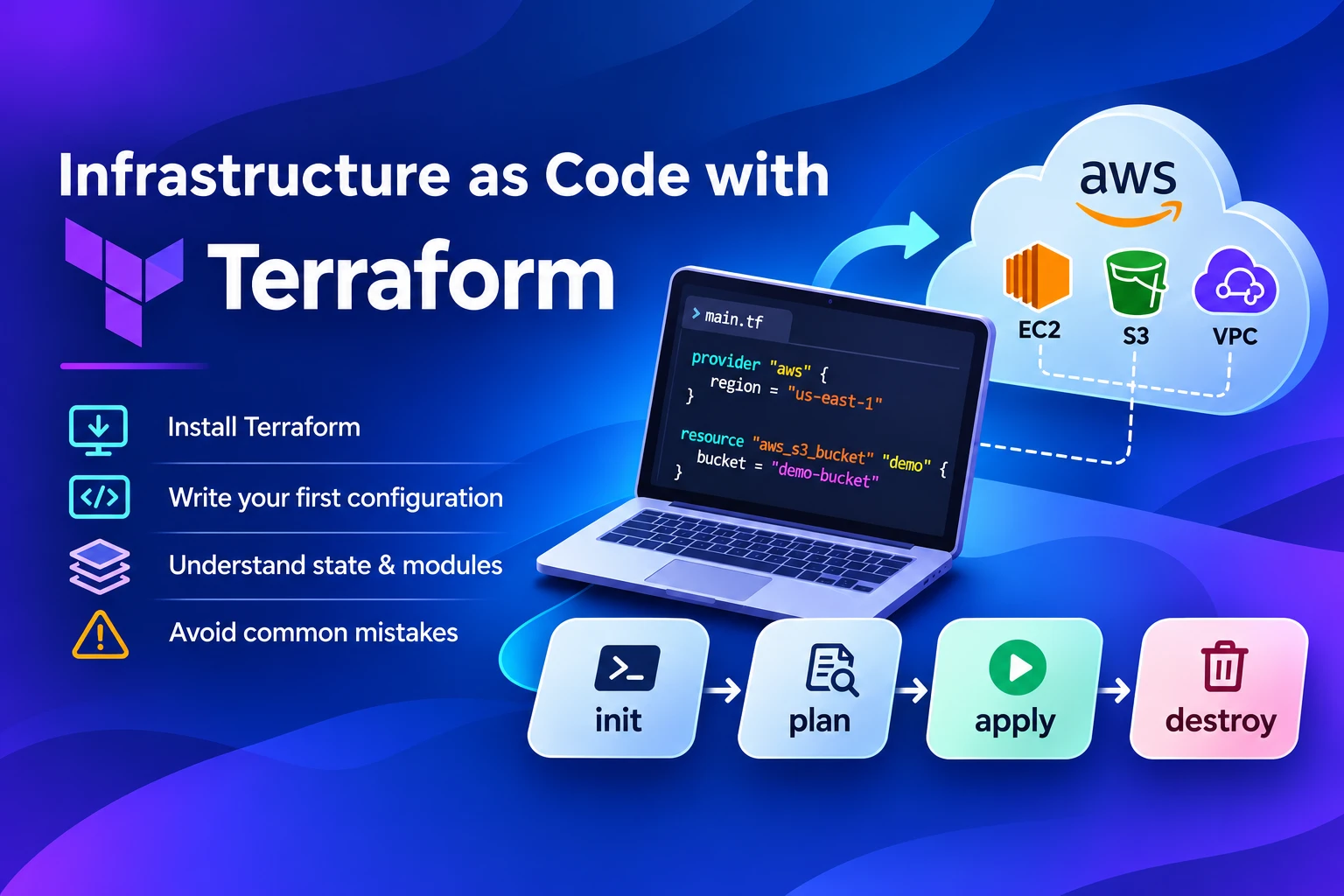
Infrastructure as code with Terraform means you describe your servers, networks and storage in plain text files, and Terraform builds them for you. Change the file, run one command, and the real infrastructure follows. This guide is for engineers and DevOps beginners who want a clear path from zero to a working first project.
By the end, you will be able to:
- Install Terraform and check that it runs
- Write and apply a first configuration on AWS
- Understand state, remote backends and modules
- Avoid the mistakes that cost new teams the most time
The examples stay small on purpose. Every step can be repeated on a personal AWS account, and we finish with a destroy command so nothing lingers on your bill.
What is infrastructure as code?
Infrastructure as code (IaC) is the practice of defining servers, networks and storage in version-controlled files instead of clicking through a cloud console. The files become the source of truth, and a tool reads them to create, change or remove real resources.
Three gains show up first:
- Repeatability: the same files build the same setup in development, staging and production.
- Review: every change goes through a pull request, so a second engineer sees it before anything runs.
- History: Git records who changed what and why, which a console never does well.
Picture a team that builds a test network by hand on Monday. By Friday, nobody remembers which firewall rule was added or why. With code, the answer sits in the commit log, and the whole network can be rebuilt from the same files.
Why teams choose Terraform
Terraform is a declarative provisioning tool from HashiCorp that talks to many clouds through plugins called providers. You describe the end state you want, and Terraform works out the steps to reach it.
Three traits explain its popularity:
- Declarative style: you state what should exist, not how to build it.
- One workflow, many platforms: AWS, Azure, Google Cloud, Kubernetes and many SaaS products share the same commands.
- Preview before change: a plan shows what will be created, changed or destroyed before anything happens.
| Tool | Main job | Language | Best fit |
|---|---|---|---|
| Terraform | Provision infrastructure | HCL | Builds that span clouds or services |
| OpenTofu | Provision infrastructure (community fork) | HCL | Teams that want an MPL 2.0 licence |
| Ansible | Configure machines and run tasks | YAML | Software setup inside servers |
| AWS CloudFormation | Provision AWS resources | JSON or YAML | AWS-only teams |
Terraform and Ansible often work together: Terraform builds the machines, and Ansible configures what runs on them.
A licence note: since August 2023, Terraform has used the Business Source License instead of an open-source licence, and OpenTofu is a Linux Foundation fork under MPL 2.0. The BSL restricts offering a competing commercial product, so most teams managing their own infrastructure are unaffected. If you are unsure, ask your legal team. Most commands in this guide work in OpenTofu too, using the tofu binary.
Terraform concepts you need first
Seven building blocks cover almost everything in this guide. Skim the table now and come back to it when a term feels unfamiliar.
Concept | Plain-English meaning |
|---|---|
Provider | A plugin that lets Terraform talk to a platform such as AWS |
Resource | One thing Terraform manages, such as a storage bucket or a virtual machine |
Data source | A read-only lookup of something that already exists |
Variable | An input value that changes behaviour without editing the code |
Output | A value Terraform prints or passes on after an apply |
State | Terraform’s record of what it has built |
Module | A reusable folder of Terraform code |
How to install Terraform
Installing Terraform takes a few minutes on any major operating system. Pick your platform, then confirm the version.
- macOS: run brew tap hashicorp/tap, then brew install hashicorp/tap/terraform.
- Windows: run choco install terraform in an administrator terminal, or download the binary from HashiCorp.
- Linux: add the HashiCorp package repository, then install with apt or yum. The exact steps change with each release, so follow the official Terraform install page.
- Prepare AWS access: install the AWS CLI and run aws configure so Terraform can find your credentials. Never write credentials inside a .tf file.
Confirm the install worked:
terraform -version
If the command prints a version number, you are ready.
Write your first Terraform configuration
A first configuration needs only four pieces: a version block, a provider, one resource and one output. Create an empty folder and save the code below as main.tf.
terraform {
required_version = “>= 1.5” # minimum Terraform version
required_providers {
aws = {
source = “hashicorp/aws”
version = “~> 6.0” # pin the provider to one major version
}
}
}
provider “aws” {
region = “ap-south-1” # Mumbai; change to your region
}
resource “aws_s3_bucket” “demo” {
bucket = “pqa-terraform-demo-12345” # must be globally unique; change it
}
output “bucket_name” {
value = aws_s3_bucket.demo.bucket # printed after apply
}
What each block does:
- The terraform block sets the minimum Terraform version and pins the AWS provider, so a surprise upgrade cannot break your code.
- The provider block tells Terraform which platform and region to use.
- The resource block declares one S3 bucket. The two labels, aws_s3_bucket and demo, are its type and its local name.
- The output block prints the bucket name once the apply finishes.
As the project grows, split the code across three files: main.tf for resources, variables.tf for inputs and outputs.tf for outputs. Terraform reads every .tf file in the folder as one configuration, so the split is for human readers.
The Terraform workflow: init, plan, apply, destroy
Every Terraform project follows the same four commands: init, plan, apply and destroy. The picture below shows where each one sits.
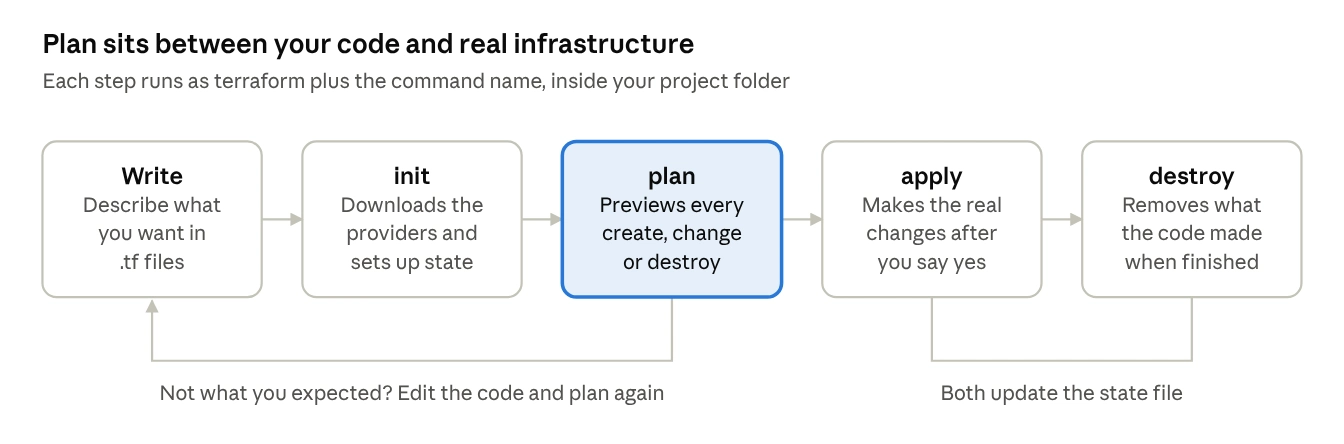
Terraform workflow · 5 steps, 1 review loop
- terraform init prepares the folder. It downloads the providers and sets up where state is stored. Run it once per project, and again after adding a provider or changing the backend.
- terraform plan compares your code with what already exists and prints a preview. A plus sign means create, a tilde means change in place, and a minus sign means destroy.
- terraform apply shows the plan again and waits for a yes before it makes any change.
- terraform destroy removes everything the configuration created. Use it for practice projects and short-lived test environments.
Two helper commands are worth running before every plan: terraform fmt tidies formatting and terraform validate checks syntax.
Make reading the plan a habit. Most costly mistakes are visible in the plan output before they happen.
Using variables, locals and outputs
Variables, locals and outputs remove hard-coded values, so one configuration can serve many environments. Variables are inputs, locals are named values calculated inside the code, and outputs are results you want to see or reuse.
variable “bucket_name” {
type = string
description = “Globally unique name for the demo bucket”
}
variable “environment” {
type = string
default = “dev”
}
locals {
common_tags = {
Environment = var.environment
ManagedBy = “terraform”
}
}
resource “aws_s3_bucket” “demo” {
bucket = var.bucket_name
tags = local.common_tags
}
A few rules keep secrets safe:
- Never write passwords, tokens or cloud credentials in .tf files or commit them to Git.
- Pass secret values through environment variables that start with TF_VAR_, or fetch them from a secrets manager.
- Mark a variable sensitive = true to hide it from the console output. This does not remove it from the state file, which is covered next.
Terraform state and remote backends
The Terraform state file is a record that links each resource in your code to the real object in the cloud. Without it, Terraform cannot tell what it already built. By default it sits on your laptop as terraform.tfstate.
Local state works for a solo experiment and fails for a team:
- Two engineers hold two different copies, and the later apply overwrites the earlier one.
- A lost laptop means a lost record of your infrastructure.
- Nothing stops two applies from running at the same moment.
A remote backend fixes all three. It stores the state in a shared place, locks it during a run, and keeps older versions. Here is an S3 backend:
terraform {
backend “s3” {
bucket = “your-team-tfstate”
key = “demo/terraform.tfstate”
region = “ap-south-1”
encrypt = true
use_lockfile = true # S3-native locking in recent Terraform versions
}
}
Three cautions apply:
- Create the state bucket separately, with versioning switched on, before pointing a project at it.
- Treat the state file as sensitive. It can hold secret values in plain text, so limit who can read it.
- Older setups lock state with a DynamoDB table. Check the S3 backend documentation for your Terraform version before choosing.
Organise your code with modules and environments
A Terraform module is a folder of configuration that you call from other code, much like a function in a programming language. Create one the second time you find yourself copying the same block of resources.
A simple layout keeps shared code apart from environment settings:
infrastructure/
modules/
storage/
main.tf
variables.tf
outputs.tf
environments/
dev/main.tf
staging/main.tf
production/main.tf
Each environment calls the module with its own values:
module “storage” {
source = “../../modules/storage”
bucket_name = “pqa-dev-assets”
environment = “dev”
}
Give every environment its own state file. A mistake in development then cannot touch production. Keep modules small and single-purpose, so a reader can understand one in a few minutes.
Common Terraform mistakes and how to avoid them
Most beginner problems come from five habits. Each one has a simple fix.
| Mistake | Why it hurts | Fix |
|---|---|---|
| Changing resources by hand in the console | Terraform sees the difference and may revert your change or fail | Make every change in code, and run a plan to spot drift |
| Committing state or secrets to Git | Anyone with repository access can read them | Add *.tfstate, .terraform/ and secret files to .gitignore, and use remote state |
| Skipping version pinning | A provider upgrade can change behaviour overnight | Pin provider versions and commit the .terraform.lock.hcl file |
| One huge configuration for everything | Plans run slowly and one error can touch everything | Split by environment and by service area, each with its own state |
| Applying without reading the plan | Surprise deletions reach real systems | Read every plan, and require a second reviewer for production |
Running Terraform in a team pipeline
Teams run Terraform through a CI/CD pipeline: a plan on every pull request, and an apply only after review and merge. This removes the risk of one person applying from a laptop with stale code.
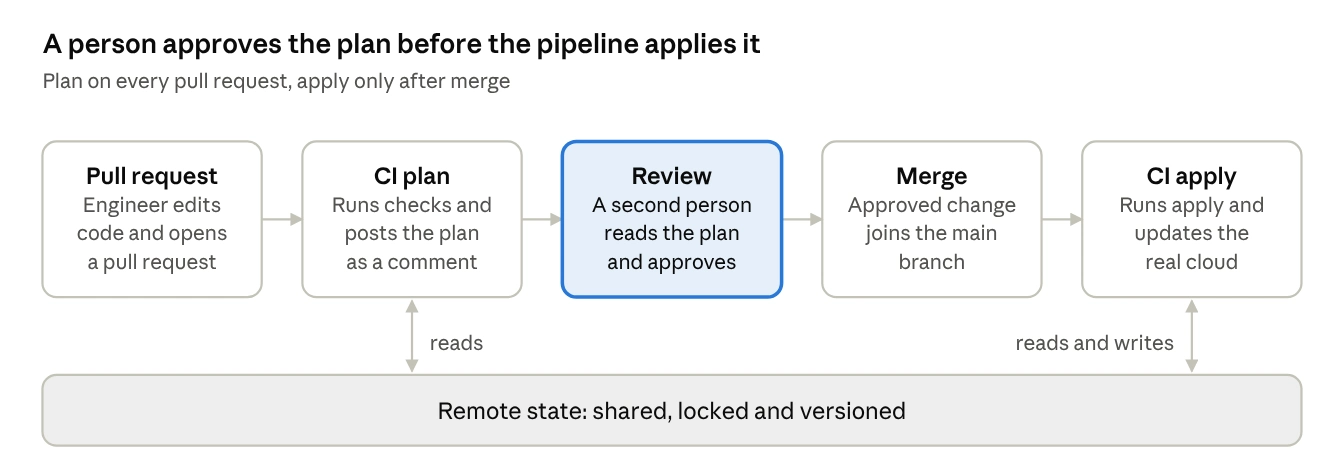
Team Terraform pipeline · 5 steps with shared remote state
Four rules keep the pipeline safe:
- Post the plan on the pull request, so reviewers see the exact changes.
- Apply only from the main branch, and only after approval.
- Add a manual approval step for production, and limit who can approve it.
- Give the pipeline short-lived credentials through your cloud provider’s identity federation, not a long-lived password stored in CI settings.
This is the kind of pipeline that the DevOps team at PQ Angels Technologies sets up for clients, alongside its VLSI, embedded and software engineers. The service covers CI/CD, infrastructure as code, containers, monitoring and DevSecOps. If your team wants a second pair of eyes on a Terraform layout or a pipeline design, you can book a discovery call.
A four-week plan to learn Terraform
A steady pace of about 24 hours over four weeks covers everything in this guide. The chart shows one suggested split. It is a starting point, not measured data, so adjust it to your own pace.
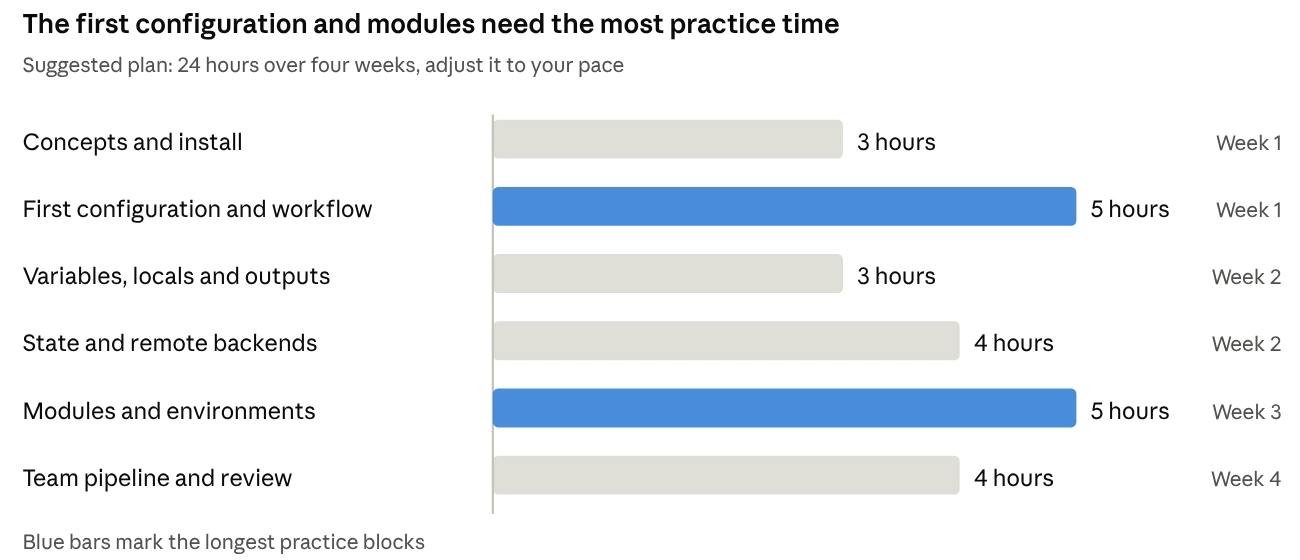
Suggested learning plan, not measured data · 6 topics over 4 weeks
Spend the extra time on hands-on practice. Reading about state and modules helps, but breaking a test project and fixing it teaches more.
Frequently asked questions about Terraform
Is Terraform free to use?
Yes, the Terraform command-line tool is free to download and use. HashiCorp also sells paid cloud products for team management. The cloud resources you create still cost whatever your provider charges.
Is Terraform a programming language?
No. Terraform uses HCL, the HashiCorp Configuration Language, which describes the end state you want. It has variables, loops and conditions, but you never write step-by-step build instructions.
What is the difference between Terraform and Ansible?
Terraform provisions infrastructure such as networks, databases and servers. Ansible configures the software inside those machines. Many teams run Terraform first and Ansible second.
Where should Terraform state be stored?
In a remote backend with locking, encryption and versioning, such as Amazon S3, Azure Blob Storage or Google Cloud Storage. Do not keep it in Git.
What happens if two people run apply at the same time?
With a remote backend that locks state, the second run waits or fails instead of overwriting the first. With local state, nothing stops the clash.
Can I bring existing infrastructure into Terraform?
Yes. The terraform import command, or an import block in Terraform 1.5 and later, links existing resources to your code. You still need to write matching configuration, and a clean plan with no changes tells you the match is right.
How long does it take to learn Terraform?
Many engineers can write and apply a simple configuration within the first week. Comfort with state, modules and pipelines takes longer, and the four-week plan above is a reasonable pace.
To sum up
Infrastructure as code with Terraform rests on four habits: write declarative code, read every plan, keep state remote and locked, and review changes through a pipeline. Start with one small project today. For more engineering guides, visit the PQ Angels blog.
Licence facts used | Terraform moved to the Business Source License in August 2023, and OpenTofu is a Linux Foundation fork under MPL 2.0. Both come from third-party search results, not the vendor pages, so confirm them. |
Charts | The learning-plan chart shows a suggested plan, labelled as such, not measured data. The two diagrams are drawn from the commands in the article. |
Client proof | No PQ Angels case study or result is included. Add one only if the client supplies or approves it. |
Still needed | Author or reviewer name for the byline, FAQ schema markup, and image alt text (suggestions are in the SEO table). |
AI-detector note | No tool can guarantee a pass, because detectors disagree. A human read-through on your side is the best safeguard. |
