
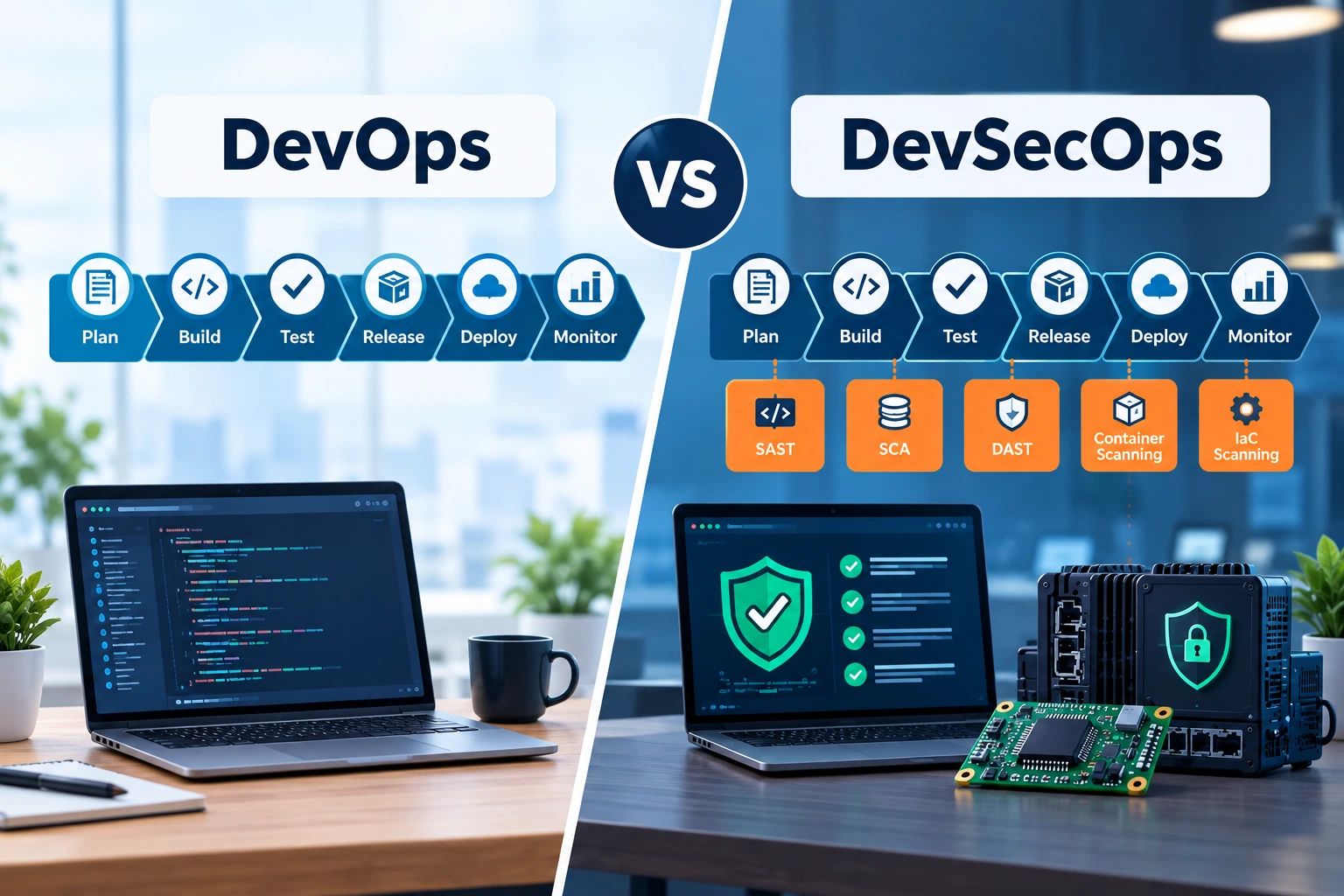
DevSecOps vs DevOps is usually explained as a difference in mindset. That much is true, but it skips the part an engineering team actually needs to know: at what point security enters the pipeline, and what changes because of it. In DevOps, security checks sit near the end of the release process, run as a gate before code reaches production. In DevSecOps, those checks move into every stage of the pipeline, from the first commit through to the system running live. The gap between the two is not philosophical. It shows up in who owns security, which tools your team runs each day, how long a flaw sits undetected before someone finds it, and how the pipeline itself is built, stage by stage.
This piece walks through the actual changes, including what changes when the product your team ships includes firmware or hardware and not just a web application.
What DevOps Covers Day to Day
Before comparing the two, it helps to be plain about what DevOps already does, since DevSecOps builds on top of it rather than replacing it.
A typical DevOps pipeline runs through a familiar sequence: plan, build, test, release, deploy, monitor. Code moves from a developer’s branch through automated builds and tests, gets packaged, and lands in staging before production. Along the way, the team owns speed, reliability, and the smoothness of that path from commit to release. Metrics like deployment frequency, lead time for changes, and mean time to recovery are the ones a DevOps team tracks and reports on.
Security still exists in this picture. It just tends to sit at the edges. A penetration test before a major release. A manual review when a new library gets added. A security team that reviews the build once it’s close to done, separate from the day-to-day work of the engineers writing the code. None of that is wrong on its own. It’s simply late enough in the process that a flaw found there is more costly to fix than a flaw found in the first draft of the code.
This is the gap that gave rise to DevSecOps: not a failure of DevOps, but a gap in where security sat inside it.
What Changes With DevSecOps
The short version: security stops being a stage and becomes a set of checks running across every stage. But “security everywhere” is vague until you see it against the actual mechanics of a team’s week.
Pull requests. In a DevOps-only pipeline, a pull request gets reviewed for logic, style, and test coverage. In DevSecOps, the same pull request also runs through automated scanning before a human ever looks at it: static analysis on the new code (SAST), a check against known vulnerabilities in any third-party library the change pulls in (SCA), and often a scan for hardcoded secrets like API keys or tokens accidentally left in the diff. A pull request that would have merged cleanly in a DevOps pipeline can get blocked in a DevSecOps one, not because the logic is wrong, but because a dependency it uses has a known flaw.
Pipeline stages. The CI/CD pipeline itself grows extra gates. Where a DevOps pipeline runs build, test, deploy, a DevSecOps pipeline adds security scanning at the build stage, dynamic testing (DAST) against a running instance before release, container image scanning if the app ships in containers, and infrastructure scanning if the team defines infrastructure as code. Each gate adds a few minutes to the pipeline. Multiply that across dozens of daily builds and it is a real cost, not a rounding error, which is worth admitting up front rather than glossing over.
Team composition. DevOps teams are usually developers and operations engineers working from a shared backlog. DevSecOps adds a security voice into that same backlog, not as an external reviewer who shows up at the end, but as someone who helps set the scanning rules, decides what counts as a blocking severity, and works with developers directly when a finding needs a fix rather than just filing a ticket and walking away.
On-call and incident response. In DevOps, an incident usually means a service is down or slow. In DevSecOps, the on-call rotation also covers a different kind of incident: an exposed secret, a container running with an unpatched library, an alert from a runtime monitoring tool that something in production is behaving in a way it shouldn’t. The response playbook has to cover both kinds of failure, not just the operational one.
One distinction worth being precise about, since it gets blurred often: DevSecOps is not the same thing as SecDevOps. DevSecOps still puts development first and adds security as a shared responsibility inside that process. SecDevOps flips the order, building security requirements into the plan before a line of code is written, which matters more in environments where a late-stage security failure isn’t just expensive to fix but genuinely dangerous, such as safety-related embedded systems. Most teams asking “DevSecOps vs DevOps” are really deciding whether to add security checks into an existing DevOps flow, which is the DevSecOps path, not the SecDevOps one.
DevOps vs DevSecOps: A Side-by-Side Comparison
| DevOps | DevSecOps | |
| When security runs | Near the end, as a gate | At every stage, from commit to production |
| Who owns security | A separate security team or a late review | Shared across developers, operations, and security |
| Pipeline gates | Build, test, deploy | Build, test, deploy plus SAST, DAST, SCA, secret scanning, image and IaC scanning |
| Main metrics | Deployment frequency, lead time, recovery time | The same metrics plus time to remediate a flaw and percentage of builds passing security checks |
| Compliance posture | Checked before release, often manually | Checked continuously, with an audit trail built into the pipeline |
| Common tools | Jenkins, GitHub Actions, Terraform, Kubernetes | The same tools, plus Snyk, OWASP ZAP, HashiCorp Vault, OPA or Kyverno |
Where Security Gates Sit in the Pipeline
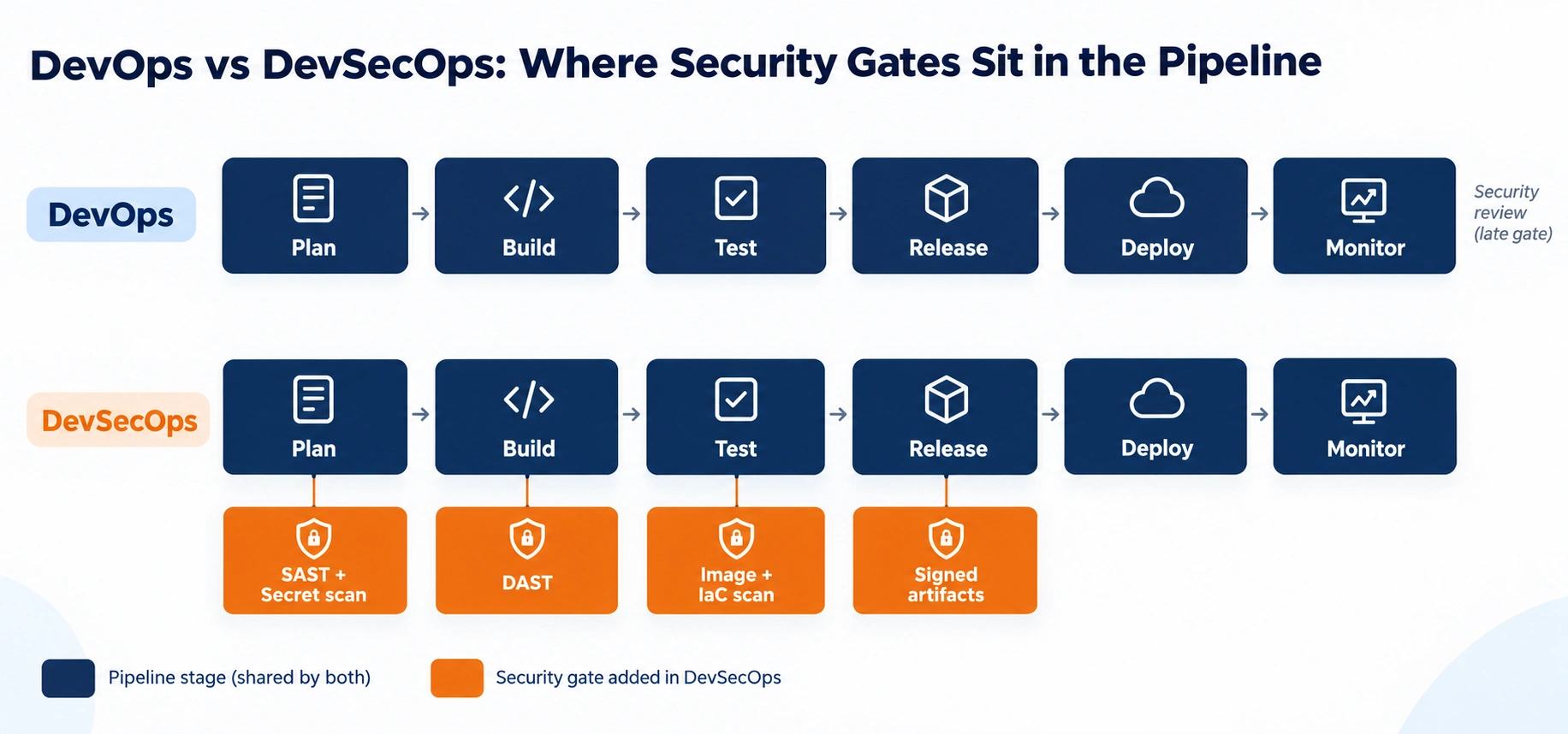
The DevSecOps row adds four security gates directly onto the same pipeline stages a DevOps team already runs.
What Changes When You’re Shipping Firmware or Hardware, Not Just Software
Most articles on this topic stop at the web application layer: containers, cloud infrastructure, APIs. That’s a reasonable default when most software is exactly that. But for a team building embedded systems, VLSI-based products, or anything where the release artifact is firmware rather than a container image, the picture changes in ways that rarely get a mention.
Two compliance frameworks come up often in this space: MISRA and AUTOSAR. MISRA is a set of coding rules for C and C++ built to cut out patterns that cause undefined behaviour, and it matters because a memory bug in firmware on a device in the field is far harder to patch than a bug in a cloud service. AUTOSAR is a software architecture standard used across the automotive industry that defines how components talk to each other and where security boundaries sit. Neither is a checkbox you tick once. Both need scanning tools built into the pipeline that check every commit against the rule set, the same way SAST checks a web app’s code, just for a different rule book.
Beyond compliance, the practical differences run deeper:
Signed firmware. A web app can roll back a bad deploy in minutes. A device with faulty firmware in the field can’t be rolled back the same way. Firmware images need to be signed as part of the build, and the device needs to check that signature before accepting an update, so an attacker can’t push a malicious image onto a fleet of deployed hardware.
Secure boot. Where a cloud service trusts its own infrastructure by default, an embedded device has to verify, at power-on, that its own bootloader and firmware haven’t been tampered with. This is a chain of checks from the first stage of boot onward, and it doesn’t exist at all in a typical DevSecOps pipeline built for web applications.
Debug interface lockdown. JTAG and SWD debug ports are open by default on most development boards, which is exactly what makes them a target once a product ships. Locking these down, or requiring authenticated debug access, is a step that has no equivalent in a container-based DevSecOps pipeline.
Component and supply chain provenance. Software has open-source dependency scanning. Hardware has a bill of materials (BOM), and the equivalent question is whether every chip and component in that BOM came from a verified source, not a counterfeit or tampered part introduced somewhere in the supply chain.
Field-life patching. A SaaS product gets patched the moment a fix ships. A device already deployed in the field might run the same firmware for years, which means the security posture at release day has to hold up far longer than a typical web release, and the update mechanism itself has to be reliable enough to reach devices that may be offline, remote, or difficult to access physically.
None of this replaces the standard DevSecOps practices covered above. It sits on top of them. A team building embedded systems or working across the VLSI design flow needs both layers running at once, because the software running on the chip and the chip itself both carry their own security surface.
The Trade-offs Nobody Puts in Writing
Most comparisons of DevOps and DevSecOps list only the upside of adding security. That’s not the full picture, and pretending otherwise doesn’t help a team plan for the change.
Pipelines get slower, at least at first. Adding SAST, SCA, DAST, and image scanning to a build means more steps, and more steps mean more minutes per build. Teams used to a fast feedback loop can find that loop stretched out, sometimes by a noticeable margin, until the scanning rules get tuned to the codebase.
New kinds of failures show up. A build that used to fail only on a broken test can now fail because a scanner flagged a dependency with a known flaw that has no available fix yet, or because a false positive triggered a block. Someone has to own tuning those rules, or the team starts ignoring the alerts altogether, which defeats the purpose.
Getting developers to actually fix what gets flagged, rather than suppress the warning or push the ticket to the bottom of the backlog, takes real work. A scanning tool that produces findings nobody acts on is a cost with no benefit attached.
The upside is real too, and it’s worth stating plainly rather than only as a warning. Research from Google Cloud’s DORA team, drawn from years of surveys across thousands of engineering teams, has found that organisations with stronger security integration in their pipeline tend to also have higher deployment frequency, not lower, once the process matures past the initial setup cost. The friction is real in the first weeks. It is not permanent, and teams that plan for it upfront handle the change with far less disruption than teams that run into it midway through. The full research is available through Google Cloud’s DORA program.
A Working DevSecOps Checklist for Engineering Teams
Rather than a list of principles, here is what an engineering team building both software and hardware-adjacent products needs in place, in order of where it sits in the pipeline:
- Secret scanning before commit. Catch API keys, tokens, and credentials before they ever leave a developer’s machine, not after they reach a shared repository.
- Static analysis on every pull request (SAST). Flag insecure code patterns at review time, when a fix costs minutes instead of a rollback.
- Dependency scanning (SCA). Check every open-source library pulled into the build against known flaws, and block anything above the team’s agreed severity threshold.
- Container and image scanning. If the build ships as a container, scan the base image and every layer added on top, not just the application code.
- Infrastructure as code scanning. Check Terraform, CloudFormation, or similar templates for misconfigurations before they provision anything.
- Dynamic testing against a running build (DAST). Test the application the way an attacker would, against a real running instance, not just the source.
- Signed and verified build artifacts. Only artifacts built and signed by the pipeline should be allowed to deploy, whether that’s a container image or a firmware binary.
- Secrets management through a vault. No credentials in code or config files; secrets get injected at runtime from a managed store with rotation in place.
- Runtime monitoring in production. Watch for behaviour that shouldn’t happen once the build is live, not just at deploy time.
- Firmware-specific controls where hardware is involved. Signed firmware updates, secure boot verification, and locked-down debug interfaces for any product that ships as a physical device.
A gap in any one of these is not a process failure so much as an open door with a date attached to it.
DevOps or DevSecOps: How to Decide
For most teams, this isn’t really a choice between two separate paths. DevSecOps builds on DevOps rather than replacing it, so the real question is when to add the security layer, not whether to.
A few signals make that timing clearer:
If the product handles payment data, health records, or personal information, the decision is close to made already. PCI DSS, HIPAA, and similar rules expect continuous security checks, not a once-a-year audit, and a DevSecOps pipeline is the practical way to meet that.
If the product includes firmware, embedded software, or anything that ships as a physical device, the case is stronger still, since a flaw found after release is far harder and far more costly to fix than one caught in a container that gets redeployed in minutes. This is where our DevOps and DevSecOps work is built to cover both layers together.
If the team is early-stage and moving fast with a product that carries little regulatory exposure, a plain DevOps setup with a security review before major releases is a reasonable place to start, with the security layer added as the product and the compliance exposure grow.
The size of the team matters less than the data and devices involved. A five-person team shipping firmware to a regulated industry needs DevSecOps practices from day one. A fifty-person team shipping an internal tool with no sensitive data can reasonably wait.
Frequently Asked Questions
Do we need a dedicated security engineer, or can our DevOps team absorb this?
A small team can absorb the early stages of DevSecOps, mainly the automated scanning, using existing DevOps engineers, as long as someone owns tuning the rules and deciding what blocks a build. Once the pipeline includes signed firmware, secure boot, or regulated compliance checks, a dedicated security role becomes worth the cost, because those areas need judgement calls a general-purpose engineer isn’t trained to make.
How long does moving from DevOps to DevSecOps actually take?
For a team with an existing CI/CD pipeline, adding the first layer of scanning, secret detection and dependency checks, usually takes a few weeks. Getting the full set of checks tuned well enough that the team trusts the results, rather than working around them, tends to take a few months. Teams that try to add every check at once in a single sprint almost always end up disabling half of them within weeks because the noise outweighs the value.
Does DevSecOps slow down release velocity for good?
It adds time to each build, and that cost doesn’t disappear. What tends to change over a few months is that the rules get tuned, false positives drop, and the team stops treating security checks as a separate step and starts treating them as part of writing the code. Teams with mature DevSecOps pipelines generally report deployment frequency on par with or higher than teams with no security integration at all, once that tuning period is behind them.
Is DevSecOps too much for a small team?
Not if it’s scoped to what the team actually needs. A five-person team doesn’t need a dedicated security engineer or every scanning tool on day one. Secret scanning and dependency checks alone catch a large share of common flaws and cost very little to add to an existing pipeline. The full checklist above is a target to grow into, not a bar every team has to clear immediately.
What changes for a team shipping firmware or embedded software specifically?
Everything in a standard DevSecOps pipeline still applies, but it sits alongside a second layer built for hardware: signed firmware updates, secure boot chains, locked debug interfaces, and verified component sourcing through the bill of materials. A container-focused DevSecOps setup on its own won’t catch a tampered bootloader or a counterfeit component, which is why teams building embedded or VLSI-based products need both layers running together rather than one standing in for the other.
