
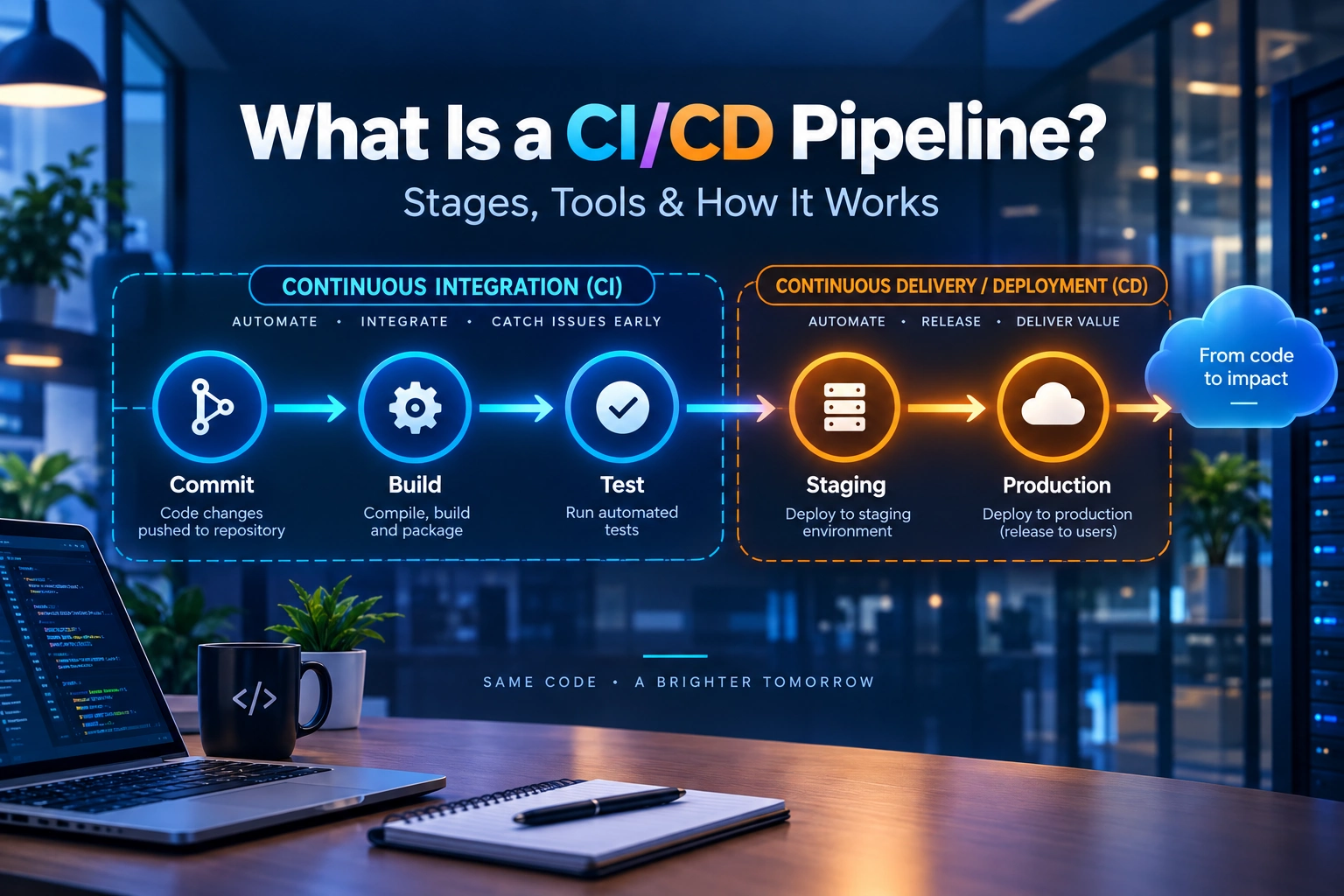
A CI/CD pipeline is an automated sequence of steps that carries a code change from a developer’s commit through building, testing and release without anyone moving it along by hand. Each commit triggers the same sequence, and every stage either passes the change forward or stops it and reports what failed.
Teams without a pipeline tend to feel the same set of problems. Code sits unmerged for weeks, then merges badly. Testing happens near the end, so bugs surface when they are expensive to fix. Releases become large, rare and risky, which makes people postpone them, which makes the next one larger still.
This guide covers what a pipeline does, the stages it runs through, the tools teams use to build one, how to decide between continuous delivery and continuous deployment, and what tends to break after the pipeline is live.
What is a CI/CD pipeline?
CI stands for continuous integration. CD stands for either continuous delivery or continuous deployment, and the two are not the same thing. Most confusion about CI/CD starts here, so it helps to settle it first.
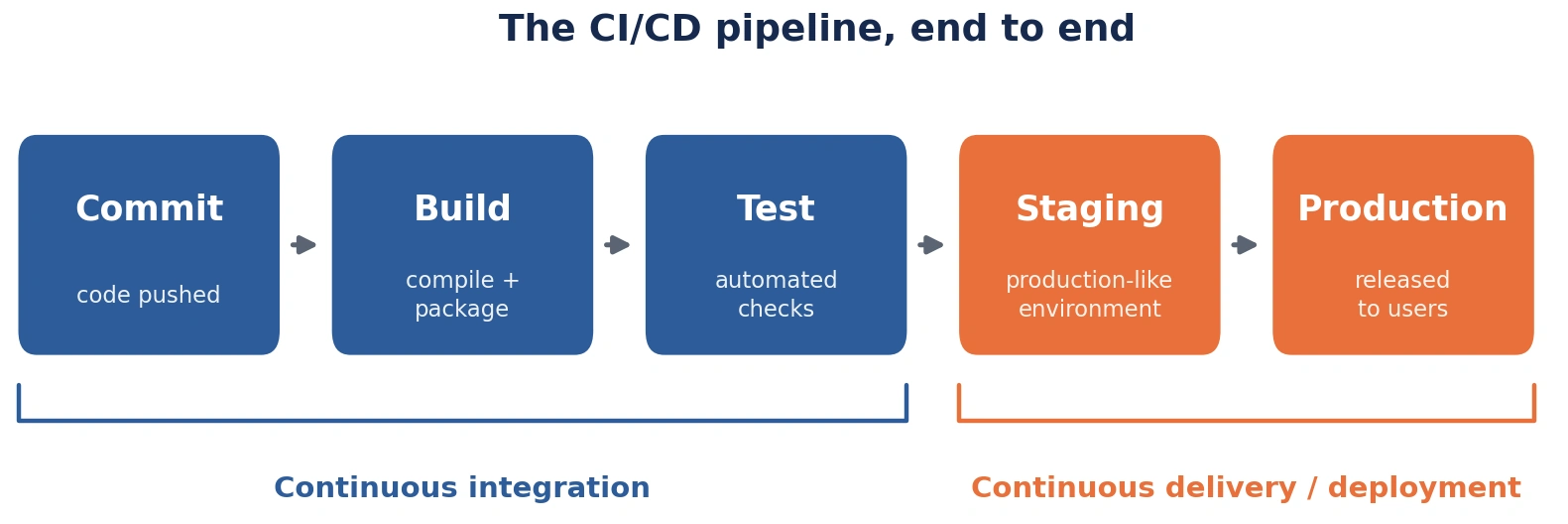
A pipeline connects both halves. The CI half handles everything from the moment code is committed to the moment a tested, packaged artifact exists. The CD half handles what happens to that artifact afterwards: where it goes, who approves it, and how it reaches users.
The word pipeline is literal. Work flows in one direction through a fixed set of stages, and each stage has an entry condition. A change that fails at any point does not continue.
What continuous integration actually means
Continuous integration is the practice of merging code into a shared branch frequently, often several times a day, with an automated build and test run on every merge.
The problem it solves is integration conflict. When four developers work in isolation for three weeks, their changes touch overlapping files, assume different versions of shared functions, and pull in dependencies that clash. Merging all of that at once produces a painful few days nobody planned for. Small, frequent merges keep conflicts small enough to resolve in minutes.
The automated build and test matter as much as the merge frequency. Merging often without checking the result just spreads broken code faster.
What continuous delivery and continuous deployment mean
Continuous delivery keeps the codebase in a state where it could be released at any moment. Every change that passes the pipeline produces a deployable artifact and moves as far as a staging environment on its own. A person still decides when it goes to production.
Continuous deployment removes that person. Once a change passes every automated check, it goes live without approval.
The difference is one step, and it is a bigger difference than it sounds. Continuous deployment puts all release confidence onto automated tests. If the test suite misses something, no human gate exists to catch it.
How does a CI/CD pipeline work?
A pipeline works on a trigger-and-gate model. Something happens in the repository, the pipeline starts, and each stage acts as a gate the change must pass to continue.
Triggers vary: a push to any branch, a pull request being opened or updated, a merge into the main branch, a version tag being created, or a scheduled overnight run. Most teams run a lighter pipeline on pull requests and a fuller one on merges to main, because pull request feedback needs to be fast.
The gate behaviour is what separates a pipeline from a build script. When a stage fails, the pipeline stops there. The failure is reported back to the commit that caused it, usually inside the pull request, and nothing downstream runs. Nobody has to notice the failure. It arrives.
This is the fail-fast principle, and it works only if failures are trustworthy. A pipeline that fails at random teaches the team to rerun it until it passes, which removes the gate entirely.
The stages of a CI/CD pipeline
Most pipelines run through six stages:
- Source — a commit lands in version control and triggers the pipeline
- Build — source code is compiled and packaged into an artifact
- Test — automated checks run against that artifact
- Package and store — the artifact is versioned and saved
- Deploy to staging — the artifact runs in a production-like environment
- Release to production — the artifact reaches users
Names differ between tools. The sequence rarely does.
Source
The pipeline begins in version control, almost always Git. A commit or merge event tells the CI system that something changed and which files it touched.
Branch strategy shapes what happens next. Teams running short-lived feature branches get one pipeline run per pull request and a second on merge. Teams running trunk-based development get one run per commit to main, which forces faster tests and tighter review, and returns quicker feedback.
Build
The build stage turns source into something runnable. What that means depends on the stack. A Java service produces a JAR. A containerised service produces an image. A Go binary is compiled for a target platform. Firmware is cross-compiled for a chip that is not the machine doing the compiling.
Dependency resolution happens here, and it is a common source of builds that pass today and fail tomorrow. Pinning dependency versions and caching them makes builds repeatable and faster at once.
Linting and static analysis usually sit at the start of this stage. They are cheap to run and catch a category of problems before anything expensive begins.
Test
The test stage is where a pipeline earns its place, and where most teams get the balance wrong.
Three layers do the work. Unit tests check individual functions in isolation and run in seconds. Integration tests check that components work together, including against real databases or message queues, and run in minutes. End-to-end tests exercise the whole system the way a user would, and run in tens of minutes.
The common mistake is over-investing in the slowest layer. End-to-end tests feel reassuring because they resemble real usage, but they are slow, they break for reasons unrelated to the change under test, and a suite full of them turns a ten-minute pipeline into a fifty-minute one. When feedback takes fifty minutes, developers stop waiting for it.
A pipeline needs a time budget. Fifteen minutes from commit to result is a fair target for the pull request path. Anything longer gets worked around.
Security checks belong here too: dependency scanning for known vulnerabilities, secret detection to catch credentials committed by accident, and container image scanning where relevant.
Package and store
A change that passes testing is packaged into a versioned artifact and pushed to a registry or artifact store.
One rule matters more than the rest: build once, deploy many times. The same artifact that passed testing is the one that goes to staging and then to production. Rebuilding per environment introduces the possibility that the thing you tested and the thing you shipped are not identical.
Deploy to staging
Staging is where the artifact runs in conditions meant to resemble production. Configuration is applied, database migrations run, and integration with real dependencies is checked.
Environment parity decides whether this stage is useful. A staging environment with a tenth of the data, a different database version, or none of the production traffic patterns will pass changes that fail an hour after release. The closer staging sits to production, the more a green result means.
Release to production
The final stage puts the change in front of users. How it gets there is a design decision with real consequences.
A rolling release replaces instances gradually, a few at a time, so part of capacity stays on the old version during the change.
A blue-green release runs two full environments side by side and switches traffic from one to the other in a single step. Rollback is a switch back.
A canary release sends a small share of traffic to the new version first, watches error rates and response times, then widens the share if the numbers hold.
Rollback belongs in the pipeline design from the start, not added after the first bad release. A team that can undo a deployment in two minutes can afford to ship more often than a team that cannot.
| Stage | What happens | Typical duration | What failure here means |
| Source | Commit lands in version control and triggers the pipeline | Seconds | Trigger or permissions problem, not a code problem |
| Build | Code is compiled and packaged into a versioned artifact | 1–5 minutes | Code will not compile, or a dependency has moved |
| Test | Unit, integration and end-to-end checks run against the artifact | 2–20 minutes | The change breaks behaviour something else relies on |
| Package | Artifact is versioned and pushed to a registry or store | Under a minute | Registry access or tagging is misconfigured |
| Staging | Artifact runs in a production-like environment | 2–10 minutes | The change works in isolation but not against real dependencies |
| Production | Artifact is released to users, usually in stages | Minutes to hours | Rollback is needed; how fast depends on release strategy |
A CI/CD pipeline example, start to finish
Take a payments team fixing a rounding bug in a currency conversion function.
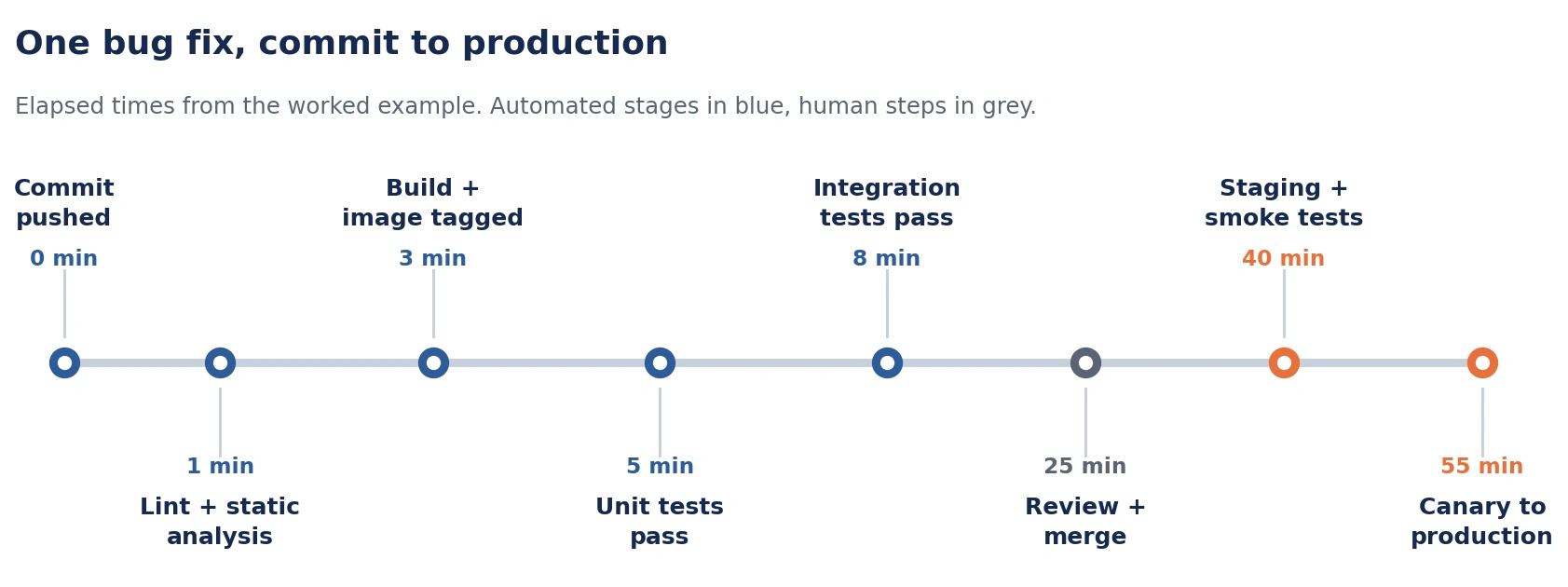
A developer writes the fix and a unit test that fails without it. They push the branch and open a pull request. The pipeline starts within seconds.
Linting and static analysis run first and finish in under a minute. The build compiles the service and produces a container image tagged with the commit hash. Unit tests run in ninety seconds and pass, including the new one. Integration tests spin up a test database and a mock payment provider, run for four minutes, and pass. Dependency scanning finds nothing new.
Total elapsed time: about eight minutes. The pull request shows green. A colleague reviews the change, approves it, and merges.
The merge triggers the main pipeline. The same checks run again, plus the end-to-end suite, which takes eleven minutes. The image is pushed to the registry and deployed to staging. Smoke tests confirm the service starts, answers health checks and converts a sample transaction correctly.
Under continuous delivery, the change now waits. A release manager sends it live during the afternoon window. Under continuous deployment, it goes to production on its own, canary first, at five percent of traffic for ten minutes while error rates are watched, then to everyone.
From commit to production: under an hour, most of it automated.
The same fix in a team without a pipeline looks different. The developer tests locally and merges. The change sits in main with eleven others until the fortnightly release. Someone builds a release candidate by hand, deploys it to a shared test environment, and finds that two of the twelve changes conflict. Working out which two takes a day. The release slips a week. When it finally ships, twelve changes go live together, and the incident that follows takes three hours to trace back to the rounding fix.
CI/CD pipeline tools
Six tools cover most of what teams run. None is the right answer on its own.
Jenkins is the long-standing open-source automation server. It runs anywhere, does anything, and has a plugin for every situation. That flexibility is also its cost. Jenkins is a system somebody has to own, patch and maintain, and plugin sprawl makes older installations hard to reason about.
GitHub Actions runs pipelines defined in YAML inside the repository, triggered by GitHub events. For teams already on GitHub it removes an entire integration problem. Hosted runners cover common cases and self-hosted runners handle anything needing particular hardware.
GitLab CI/CD works the same way inside GitLab, with the pipeline defined in a file at the repository root. GitLab bundles the registry, artifact storage and environment tracking, which suits teams who want fewer moving parts.
CircleCI is a hosted platform with fine control over execution environments and parallel test splitting, which helps when test suites are large enough that wall-clock time is the constraint.
Argo CD takes a different approach to the deployment half. It watches a Git repository holding the desired state of a Kubernetes cluster and changes the cluster to match. The pipeline updates Git; Argo CD does the deploying. This pattern is usually called GitOps.
Tekton provides pipeline building blocks that run as Kubernetes resources, which suits teams who want their delivery machinery living in the same cluster as their workloads.
| Tool | Hosting model | Best suited to | Configuration |
| Jenkins | Self-hosted | Teams needing full control and custom build agents | Groovy / Jenkinsfile |
| GitHub Actions | Hosted or self-hosted runners | Teams whose code already lives on GitHub | YAML in repository |
| GitLab CI/CD | Hosted or self-hosted runners | Teams wanting registry and CI in one place | YAML in repository |
| CircleCI | Hosted | Large test suites needing parallel execution | YAML in repository |
| Argo CD | In-cluster | Kubernetes teams running a GitOps model | Kubernetes YAML files |
| Tekton | In-cluster | Teams keeping delivery machinery beside workloads | Kubernetes resources |
How to choose a CI/CD tool
Four questions settle this faster than a feature comparison.
Where does the code already live? Staying inside GitHub or GitLab removes authentication, permissions and webhook work that otherwise has to be built and maintained.
Do builds need particular hardware? Cross-compilation, GPU workloads and anything touching physical devices push teams toward self-hosted runners, which narrows the field.
Who will own it in two years? A tool the team can operate beats a tool with better features and no owner.
What does it cost at ten times the current volume? Per-minute pricing looks cheap on a small test suite and stops looking cheap when the suite grows.
The tool is rarely what limits a pipeline. Pipeline design and test quality almost always are.
Continuous delivery vs continuous deployment: which should your team run?
Both keep changes flowing. The difference is one approval step before production, and choosing between them is a question about test coverage rather than ambition.
Four things point toward continuous delivery: automated tests that do not cover the paths where failures would hurt most, releases needing sign-off for contractual or compliance reasons, a blast radius where a bad release affects money or safety, and no reliable automatic rollback.
Four things point toward continuous deployment: test coverage the team trusts on the paths that matter, monitoring that catches problems in minutes rather than hours, a release mechanism that can roll back without a human decision, and changes small enough that any one of them is easy to reverse.
Continuous deployment is not a maturity badge. Turning it on without the test coverage to support it produces faster incidents, not faster delivery. Plenty of teams running continuous delivery well are in better shape than teams running continuous deployment badly.
Benefits of a CI/CD pipeline
Three outcomes account for most of the return.
Shorter feedback loops. A developer learns within minutes whether a change works, while the context is still in their head. The same finding a fortnight later costs an hour of re-reading code.
Lower release risk. Small changes released often are easier to reason about and easier to undo than large changes released rarely. Most of the fear around deployment comes from batch size.
Less manual work. Building, testing and deploying by hand consumes engineering time and introduces variation between one release and the next.
These are measurable. The DORA research programme tracks four delivery metrics most teams can pull from their own tooling: deployment frequency, lead time for changes, change failure rate, and time to restore service. Measuring them before building a pipeline gives a baseline worth having, and the definitions are published at dora.dev.
Where CI/CD pipelines go wrong
Five patterns account for most pipelines that get built and then quietly abandoned.
Pipelines that got slow. A suite that started at eight minutes reaches forty as tests accumulate. Developers stop waiting for results and merge on the assumption it will pass. The gate is still there; nobody is standing at it. Watching pipeline duration as a number, and splitting or parallelising tests when it drifts, keeps this from setting in.
Flaky tests. A test that fails once in twenty runs for reasons unrelated to the code teaches the team to rerun rather than investigate. Once rerunning is normal, real failures get rerun too. Quarantining flaky tests immediately and fixing or deleting them costs less than the trust they destroy.
Secrets scattered through configuration. Credentials end up in pipeline files, environment variables set in a web console, and a script somebody wrote two years ago. Nobody knows the full list, so nothing gets rotated. A secrets manager the pipeline reads from at run time fixes the visibility problem and the rotation problem together.
Environment drift. Staging and production start identical and separate over months as someone patches one and not the other. Staging keeps passing changes production rejects. Defining both environments as code, from the same definitions, stops the gap opening.
Pipelines nobody owns. One engineer builds it, understands it, and leaves. What remains is machinery the team depends on and cannot modify, so they work around it. Named ownership, and pipeline configuration reviewed like application code, prevents this.
Five ways a pipeline stops being trusted
Slow. Feedback takes so long that developers merge without waiting for it.
Flaky. Random failures teach the team to rerun instead of investigate.
Leaky. Secrets spread across configuration until nobody can rotate them.
Drifted. Staging stops resembling production, so a green result means less.
Orphaned. The engineer who built it left, and nobody else can change it.
CI/CD for embedded and hardware teams
Everything above assumes software running on a server. Firmware breaks several of those assumptions.
The build stage cross-compiles for a target processor that is not the machine running the build, so the toolchain, the board support package and the exact compiler version all become part of what has to be reproducible. A build that works on one engineer’s machine and not in the pipeline is usually a toolchain difference.
The test stage is where the gap widens. A unit test passing on a build server says nothing about how firmware behaves on the device. Timing, interrupts, peripheral behaviour and memory constraints only show up on real silicon. Teams handle this in two layers: simulation first, using tools such as QEMU or Renode to run firmware against modelled hardware, then hardware-in-the-loop testing on physical boards. A hardware-in-the-loop rig holds development boards wired to automated flashing tools, power cycling controllers and serial connections, so the pipeline can load new firmware, apply inputs, read responses and power cycle between runs.
Release looks different too. No rolling deployment exists for a device in the field. The artifact is a signed firmware image, and getting it onto hardware means over-the-air update infrastructure with its own rollback story.
Silicon design sits earlier still. CI practices are being applied to RTL linting, simulation and verification regression, but tooling remains largely custom, built around Jenkins or GitLab CI rather than bought off the shelf.
Frequently Asked Questions
What is the difference between CI and CD?
CI covers everything up to a tested, packaged artifact: merging code, building it and running automated checks. CD covers what happens to that artifact afterwards, moving it through environments toward users. CI answers whether the change is sound. CD answers how it reaches production.
Is CI/CD the same as DevOps?
No. DevOps is a way of working that puts development and operations responsibilities on the same team. CI/CD is a practice that team usually adopts. A pipeline can run without changing how teams are organised, and many do.
What triggers a CI/CD pipeline?
A repository event, most often a push to a branch, a pull request being opened or updated, or a merge into the main branch. Version tags trigger release pipelines. Scheduled runs handle overnight jobs such as long test suites or dependency checks.
How long does it take to set up a CI/CD pipeline?
A working build-and-test pipeline for a single service takes days rather than weeks on a hosted platform. Reaching automated production deployment takes longer, because it depends on environment definitions, secrets handling, rollback and test coverage. Most of the work is not the pipeline itself.
Do small teams need a CI/CD pipeline?
Small teams benefit most, because they have the least slack to absorb a broken release. A three-person team can set up build, test and deploy-to-staging in an afternoon. Full continuous deployment can wait until test coverage justifies it.
What is the difference between a CI/CD pipeline and a build script?
A build script runs when someone runs it. A pipeline runs on its own, triggered by repository events, with each stage gating the next and results reported back to the change that caused them. The scripts often survive inside the pipeline. The automation and the gates are what gets added.
Getting a pipeline that holds up
A pipeline is worth what its tests are worth. Automation moves changes faster in whichever direction they are already going, so a team that ships confidently ships more, and a team that ships shaky code ships more of it. The work that makes a pipeline pay off is mostly test quality, environment definitions and clear ownership. Tool choice is the smaller decision.
PQ Angels builds and maintains delivery pipelines across cloud services, embedded firmware and hardware-adjacent systems. If you are planning a pipeline, or trying to fix one the team has stopped trusting, talk to our DevOps team.
